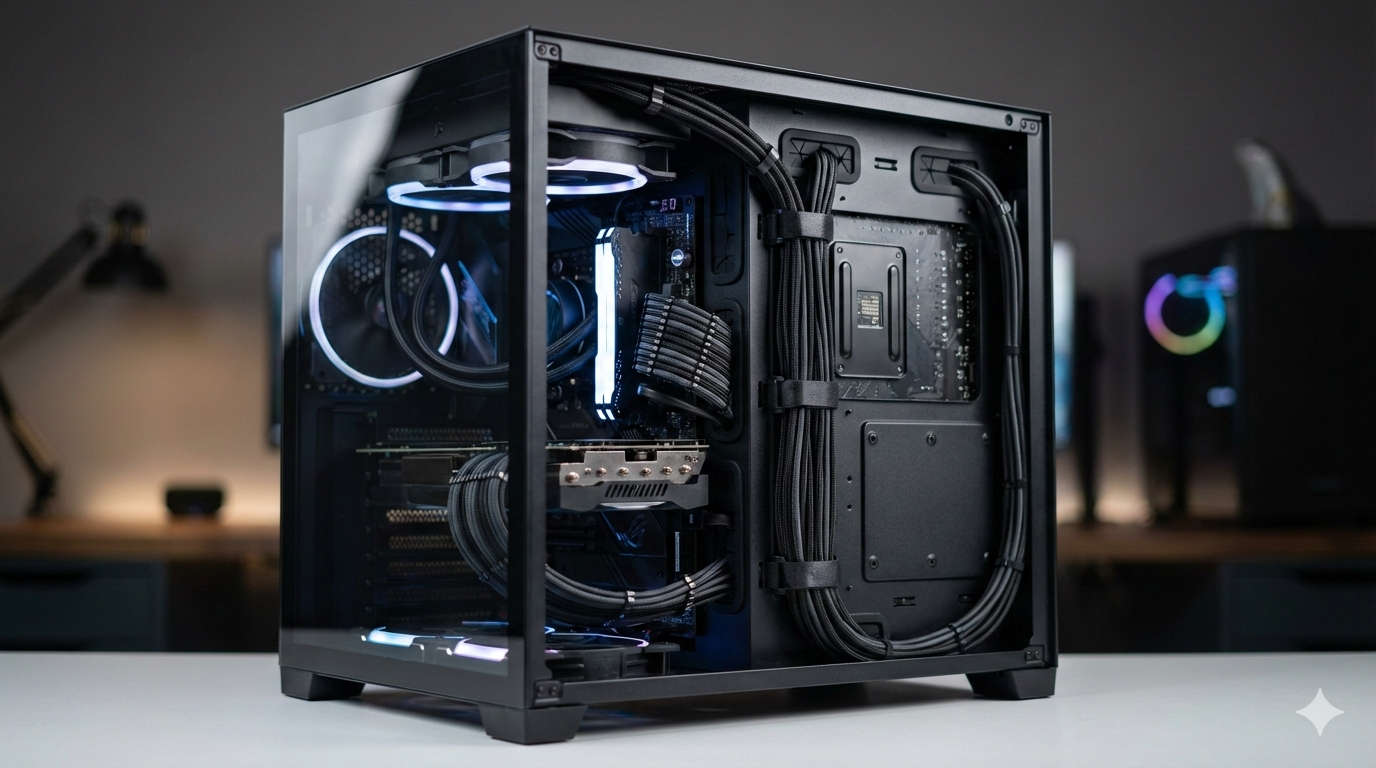
Building a custom PC is one of the most rewarding hobbies out there. You pick the perfect parts, assemble everything with care, and fire it up for the first time. But then you glance inside the case and see a tangled mess of cables blocking fans, gathering dust, and turning your sleek setup into chaos. If that hits close to home, you’re in the right place. Good cable management isn’t just about making your build look amazing—it’s about keeping things cool, quiet, and easy to work on down the line.
In 2025, with powerful new GPUs and CPUs pushing heat limits higher than ever, organizing those wires properly can make a real difference in performance. Neat routing lets air flow freely, dropping temperatures and preventing throttling during intense gaming sessions. It also cuts down on dust buildup and makes future upgrades a breeze—no more digging through knots to add a drive or swap components.
Whether you’re a beginner putting together your first rig or a veteran refreshing an older one, this guide will walk you through every step to achieve that professional, spotless look. We’ll keep things practical, straightforward, and packed with tips that actually work.
Let’s be real: skipping this step is tempting when you’re excited to boot up and play. But the payoffs are huge. First off, airflow. High-end hardware like the latest graphics cards generates serious heat.
If cables are dangling in front of intake fans or cluttering exhaust paths, you’re essentially choking your cooling system. That can raise internal temps significantly, leading to louder fans, reduced performance, or even long-term wear on parts.
A tidy interior also fights dust. Loose wires create nooks where particles settle faster, forcing you to clean more often. And when it comes time to troubleshoot or upgrade—say, installing a bigger SSD or new RAM—you’ll thank yourself for not having to wrestle with a rat’s nest.
On the visual side, especially with today’s glass-panel cases dominating builds, clean wiring turns your PC into a showpiece. It looks intentional and polished, whether you’re sharing photos online or just admiring it on your desk. Plus, organized cables reduce vibration noise from loose ends rattling against the case. In short, it’s a small effort upfront for better reliability, efficiency, and pride in your creation.
Essential Tools to Get the Job Done Right
You don’t need an expensive kit to start, but a few basics will save hours of frustration. Grab these and you’ll feel like a pro from the get-go.
Reusable zip ties are your foundation—perfect for bundling groups of cables securely without permanent commitment. Go for ones in different lengths; smaller for fan wires, larger for power runs. Velcro straps are even better for flexibility, as you can undo and readjust them easily during tweaks.
Cable combs help align thick power cables into straight, even rows, giving that custom, high-end appearance. They’re inexpensive and make a big visual impact on visible connectors.
For hiding excess length, consider custom sleeved extensions if your budget allows—they come in various colors to match your theme and eliminate sloppy loops. Magnetic clips are handy for sticking cables to metal case surfaces temporarily while planning routes.
A good pair of flush cutters trims ties neatly, and a headlamp or small flashlight illuminates tight corners. Many builders swear by velcro tie-down points built into modern cases, but adding your own ensures everything stays put.
Start simple if you’re on a budget: a pack of velcro straps and zip ties costs next to nothing and handles most jobs.
Picking Components That Make Management Easier
The secret to effortless organization often starts before assembly. Choose parts designed with tidiness in mind, and you’ll cut your work in half.
Your case is the biggest factor. Look for ones with plenty of space behind the motherboard tray—around 25-30mm or more—to stash extras comfortably. Rubber grommets for passing cables through, built-in tie points, and PSU shrouds to conceal bulky power cables are game-changers.
In 2026, standout options include the Fractal Meshify 3 for balanced airflow and routing, the Havn HS 420 for spacious interiors and excellent channels, the NZXT H9 Flow for dual-chamber designs that separate wiring, and the Lian Li Lancool series for budget-friendly yet feature-rich builds. Mesh-front panels boost cooling while wide trays accommodate thick bundles.
Power supplies should be fully modular whenever possible. Brands like Corsair’s RMx series or Seasonic’s offerings let you connect only the cables you need, slashing clutter instantly. Aim for at least 80+ Gold efficiency for reliable, cool operation.
Motherboards with back-connect designs are exploding in popularity this year. These move power, fan, and front-panel headers to the rear, leaving the main chamber almost wire-free. Look for MSI’s Project Zero, ASUS BTF, Gigabyte Stealth, or ASRock BMD series—they pair perfectly with compatible cases for ultra-clean results.
For storage, SSDs mount neatly in hidden bays, and RGB fans with daisy-chain hubs minimize individual wires. Planning around these features sets you up for success.
Step-by-Step Routing for a Flawless Interior
Approach this like a puzzle: install components gradually while routing as you go. Work in a well-lit space and test connections early.
Prep your case first. Mount the PSU at the bottom (or wherever it fits), attaching only necessary modular cables. Route them through shroud openings if available.
Install the motherboard next. Connect delicate front-panel wires immediately—they’re fiddly and best done with open access. Thread them behind the tray via nearby grommets, keeping them flat and bundled loosely.
Handle major power cables early. The thick 24-pin ATX goes through the closest grommet, plugs in, and excess pulls back for securing. CPU power (usually 8-pin) routes overhead or through top holes, avoiding radiator interference.
Storage drives mount in bays with channels; chain SATA power for fewer runs and connect data cables snugly against surfaces.
Add the GPU toward the end to keep the workspace open. Feed its power cables through side paths, using combs for straight alignment.
Fans and lighting last: run headers along frame edges, clipping securely. Hide RGB controllers in shrouded spots.
Finally, group similar cables—power together, data separate—and secure every few inches with straps. Coil extras neatly in dedicated spaces, never cramming. Boot the system open-sided to verify everything works, then adjust.
Take your time visualizing paths; rerouting now beats fixing later.
Advanced Tips for Next-Level Cleanliness
Once comfortable with basics, try these for standout builds.
Custom sleeving wraps wires in fabric for color-matched perfection, though it takes practice. Extensions provide exact lengths, eliminating bulges around corners.
Vertical GPU mounts in compatible cases reroute power cleanly. Back-connect ecosystems shine here, hiding nearly everything for panoramic glass views.
Extend organization outside: under-desk trays tame peripheral cables for a fully polished setup.
Avoiding Common Pitfalls
Don’t overtighten straps—leave breathing room to prevent insulation damage. Always route away from fans to avoid noise or interference.
Plan before closing panels; stuffed trays bulge sides unattractively. Test airflow post-build—if temps rise unexpectedly, inspect for blockages.
For non-modular PSUs, bundle unused cables tightly in hidden areas.
Maintaining Your Clean Build Long-Term
Dust creeps in over months, so clean gently every quarter with compressed air, holding fans still. Label bundles for quick upgrades.
Monitor temperatures regularly; rising numbers might signal shifted wires.
Frequently Asked Questions
Limited grommets? Adhesive clips work wonders.
Pre-built PC? Power off fully and route carefully—improvements are possible.
Non-modular PSU? Hide extras coiled in the shroud.
Beginner sleeving? Practice on spares first.
Final Thoughts: Enjoy Your Masterpiece
Taking the extra time for thoughtful cable management elevates your entire PC experience. Your rig will run cooler and quieter, look stunning, and stay hassle-free for years. In 2026’s era of innovative cases and hidden-connector tech, achieving pro results has never been more accessible. Dive in, experiment, and savor that satisfying reveal when you slide the panel on. Your clean, powerful build is waiting—go make it happen!